WORKFLOW ENGIENE

WORKFLOW ENGIENE

Enabling teams to build complex media workflows through configuration instead of custom development

Enabling teams to build complex media workflows through configuration instead of custom development

ROLE

Lead Product Designer, simplifying complex workflows at scale

SCOPE

UX Strategy, Information Architecture, Interaction Design

Context

TL:DR

TL:DR

As WSC expanded its enterprise offering, customer requirements became increasingly complex and diverse. Supporting these needs through custom development created long delivery cycles and increased dependency on engineering.The project focused on rethinking how workflows were created and managed to enable greater scalability and faster customer adaptation.

As WSC expanded its enterprise offering, customer requirements became increasingly complex and diverse. Supporting these needs through custom development created long delivery cycles and increased dependency on engineering.The project focused on rethinking how workflows were created and managed to enable greater scalability and faster customer adaptation.

Challenge

The goal was to transform a highly technical capability into an intuitive no-code experience.

The goal was to transform a highly technical capability into an intuitive no-code experience.

Workflow configuration involved technical concepts such as nodes, variables, conditions, and system logic, all of which needed to work together within a single, easy-to-understand experience.

Workflow configuration involved technical concepts such as nodes, variables, conditions, and system logic, all of which needed to work together within a single, easy-to-understand experience.

The challenge wasn’t only enabling automation - it was making a flexible system feel approachable.

The challenge wasn’t only enabling automation - it was making a flexible system feel approachable.

Research & insight

Insight 01

One workflow couldn't fit every customer

One workflow couldn’t fit every customer

Each customer had unique workflow requirements, making a one-size-fits-all approach impossible.

Each customer had unique workflow requirements, making a one-size-fits-all approach impossible.

Before

Custom solutions

Customer A

↓

Custom workflow

Custom workflow

Customer A

Customer B

↓

Custom workflow

Custom workflow

Customer B

Customer C

↓

Custom workflow

Custom workflow

Customer C

After

Reusable building blocks

Node A

Node A

+

Node B

Node B

+

Node C

Node C

↓

Customer A

Customer A

Customer B

Customer B

Customer C

Customer C

Insight 02

Powerful workflows needed to feel simple

Powerful workflows needed to feel simple

Users weren't writing code, they were configuring business logic.
The experience needed to support advanced workflow capabilities without exposing the underlying technical complexity.

Users weren’t writing code, they were configuring business logic.
The experience needed to support advanced workflow capabilities while keeping users focused on the task at hand.

Design decisions

Designing for the full workflow lifecycle

Designing for the full workflow lifecycle

The experience needed to support more than just building workflows, users needed to create, run, monitor, and manage them across different levels of complexity.

The experience needed to support more than just building workflows, users needed to create, run, monitor, and manage them across different levels of complexity.

Decisions 01

Focus on the flow

The workflow canvas became the primary workspace for building and understanding the overall process.

WHY?

Users needed to see how different steps connect and how the workflow behaves as a whole, without being overwhelmed by the complexity of each individual step.
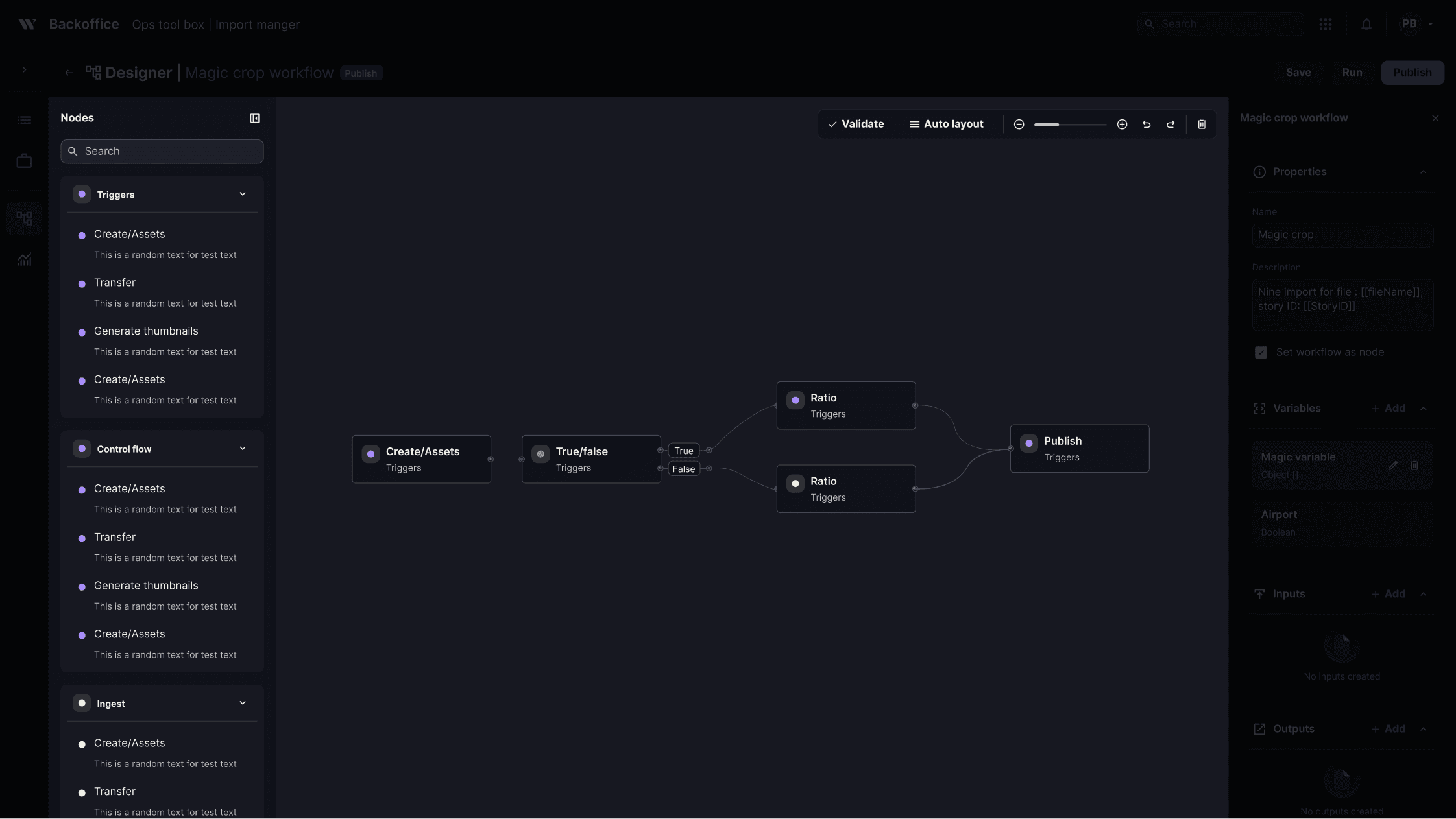
The designer

Decisions 02

Make execution easy to follow

The workflow remains the primary context when viewing an execution.

WHY?

Users need to understand what happened without losing sight of the overall workflow. The read-only timeline shows the sequence of events in context.

Timeline

Decisions 03

See the bigger picture

Dedicated views provide visibility across workflows and individual tasks.

WHY?

Users need to quickly understand overall activity and drill into specific executions when needed.

The monitor

Final design

A configurable workflow platform built for flexibility and simplicity

A configurable workflow platform built for flexibility and simplicity

The final experience enables teams to create, configure, and manage complex automation flows through a visual workflow builder.

The final experience enables teams to create, configure, and manage complex automation flows through a visual workflow builder.

The designer

Workflow definitions - manage workflows

Create and configure workflow

Impact

Speed: Reduced engineering dependency for customer-specific workflow requests.

Independence: Teams could configure customer workflows without requiring an engineer.

Scalability: Supported a broader range of customer workflows without building one-off solutions.